Building a Free Photoshop Alternative, Part 4: Curves, glfx.js and Our Own Interpolation
Reading glfx.js on GitHub helped frame the curves implementation: precompute values between control points into a 256-entry table. We wrote Photoshot’s interpolation and editor integration separately with AI, then revised the math while preserving older projects.
Sources checked · Revised October 16, 2026
Read the article ↓
What we learned from glfx.js
In evanw/glfx.js, src/filters/adjust/curves.js builds interpolated values from control points and prepares 256 entries for channel lookup. The original development record explicitly notes examining this LUT idea.
Photoshot did not adopt the whole WebGL filter. We wrote separate interpolation functions and connected them to compileAdjustment. The borrowed architectural idea and our choice of interpolation are distinct.
The first implementation used shape-preserving Hermite
Our first curveTable used shape-preserving Hermite interpolation. This excerpt chooses tangents at control points; when adjacent slopes change sign, it uses zero to limit unwanted overshoot around sharp edits.
This was not a copied glfx.js interpolator. We adopted the precomputation idea while writing the math and TypeScript implementation separately.
const m = points.map((_, i) =>
  i === 0
    ? d[0]
    : i === n - 1
      ? d[n - 2]
      : d[i - 1] * d[i] <= 0
        ? 0
        : 2 / (1 / d[i - 1] + 1 / d[i]),
);Comparison led to a natural cubic spline
Identical control points can yield different intermediate tones when interpolation differs. The upgraded path added naturalCurveTable. The excerpt is the forward calculation used to solve spline curvature.
Saying only that AI built a curves feature hides this development step: start from an inspected idea, write our own function, compare output, then revise the interpolation choice.
for (let i = 1; i < n - 1; i++) {
  const span = points[i + 1].x - points[i - 1].x,
    sig = (points[i].x - points[i - 1].x) / span,
    p = sig * y2[i - 1] + 2;
  y2[i] = (sig - 1) / p;
  const slope =
    (points[i + 1].y - points[i].y) / (points[i + 1].x - points[i].x) -
    (points[i].y - points[i - 1].y) / (points[i].x - points[i - 1].x);
  u[i] = ((6 * slope) / span - sig * u[i - 1]) / p;
}
for (let i = n - 2; i >= 0; i--) y2[i] = y2[i] * y2[i + 1] + u[i];Use the same curve version in the UI and pixels
Applying new math to every saved file could change older work. Revision 2 selects the natural spline; older adjustments keep Hermite. The curve editor selects its displayed table using the same condition.
Pixel processing first reads the individual channel table, then the shared RGB table, interpolating between adjacent entries for fractional positions. This connects the LUT idea to Photoshot’s channel order and compatibility rules.
const table = (value.revision === 2 ? naturalCurveTable : curveTable)(points),if (t === 'curves') {
x = ct![channel as Channel][i];
const f = clamp(x) * 255,
lo = Math.floor(f),
hi = Math.min(255, lo + 1);
x = ct!.rgb[lo] + (ct!.rgb[hi] - ct!.rgb[lo]) * (f - lo);
}Testing the interpolation choice
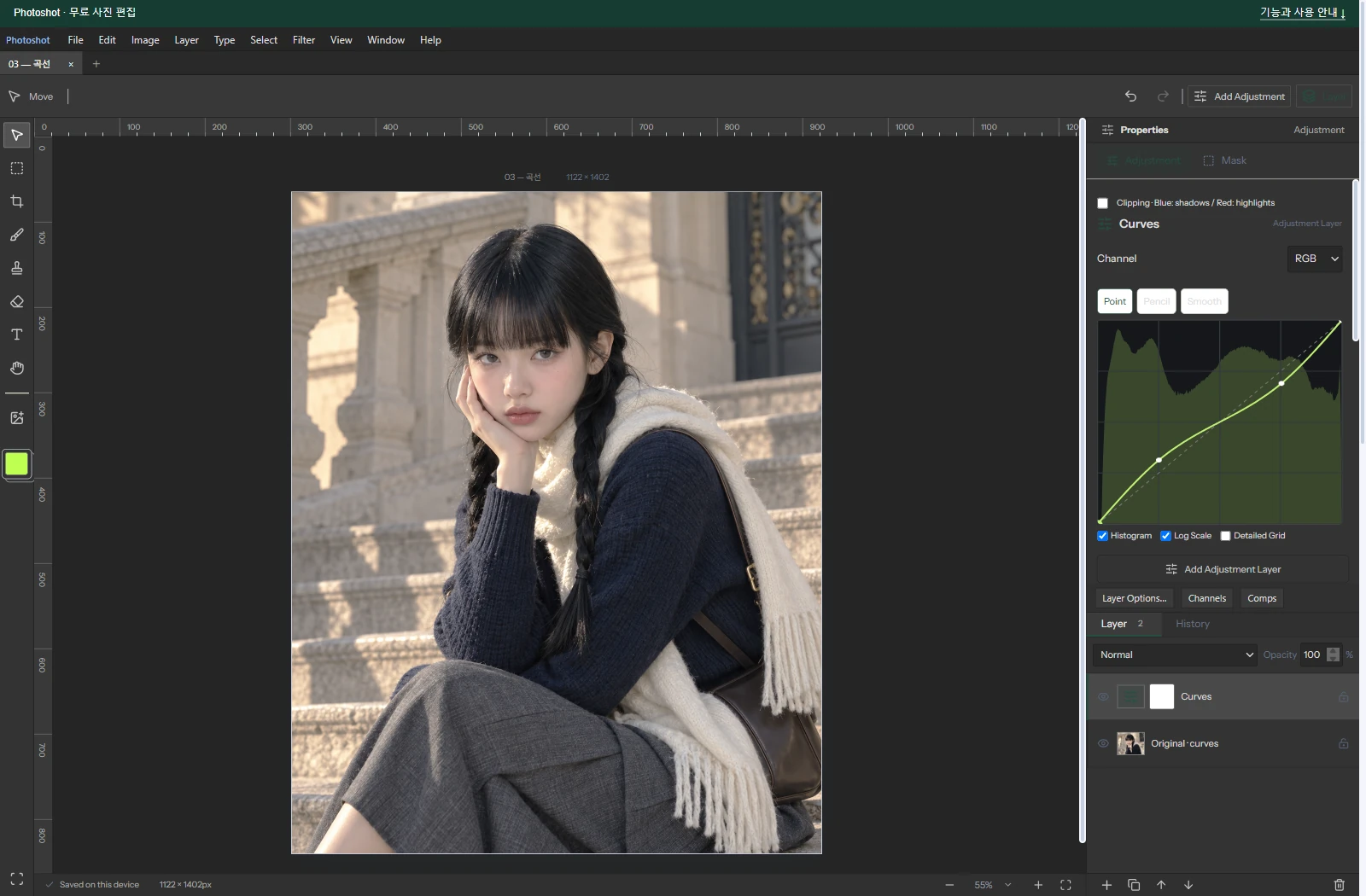
The portrait uses RGB points (0,0), (64,80), (192,176), (255,255). Its source is an AI-generated example; the editor and output are actual Photoshot results.
The historical comparison chart instead used (0,0), (64,48), (192,208), (255,255). That recorded test reached mean and maximum differences of zero after revision. It establishes agreement for that input, not every curve or photograph.

Adapt the idea to the application’s rules
glfx.js was a concrete starting point for understanding LUT-based curves. Photoshot’s Hermite and natural-spline functions, editor integration and compatibility handling were written and revised separately with AI.
Public code helped us understand a design and connect it to our layer system. Part 5 continues with exposure calculations and version compatibility.