Building a Free Photoshop Alternative, Part 5: Exposure Code, AI Revisions and Compatibility
Exposure adds another calculation to the shared adjustment structure developed through earlier reference work. This entry follows the color conversion, EV math and version branching in Photoshot’s GitHub code. The record does not identify a specific third-party exposure implementation that was imported.
Sources checked · Revised October 16, 2026
Read the article ↓
Start with the shared code we reused
Earlier entries consulted Konva and glfx.js. For exposure, the concrete reuse point is Photoshot’s compileAdjustment: exposure appears alongside brightness, levels and curves in the shared branch below.
We added the calculation to the existing layer, lookup-table and masking flow rather than building an independent editor for it. AI-assisted code extended the structure already in place.
if (['brightness', 'levels', 'curves', 'exposure', 'invert', 'posterize'].includes(t)) {const tables = ['r', 'g', 'b'].map((channel) =>
Float64Array.from({ length: 256 }, (_, i) => {
let x = i / 255;The earlier path used sRGB conversion
Exposure is not simply an EV number added to stored display-channel values. The earlier path used linear to decode sRGB and srgb to encode it again.
These are excerpts from Photoshot expressing standard color-conversion formulas in TypeScript. The record does not establish that these lines were copied from a specific repository. Writing code with AI does not mean inventing the underlying mathematics.
const linear = (s: number) => (s <= 0.04045 ? s / 12.92 : ((s + 0.055) / 1.055) ** 2.4);
const srgb = (s: number) => (s <= 0.0031308 ? 12.92 * s : 1.055 * s ** (1 / 2.4) - 0.055);Revising exposure, offset and gamma with AI
The key factor is 2 ** v.ev: +1 EV doubles the linear-domain value and −1 halves it, before offset and gamma processing. The conversion space and operation order affect the output.
After comparison, revision 2 uses the 2.2-power path. Older adjustments keep the linear/srgb path. The branch below preserves both implementations in the same function.
if (t === 'exposure')
  x =
    a.revision === 2
      ? clamp(x ** 2.2 * 2 ** v.ev + v.offset) ** (1 / (2.2 * v.gamma))
: srgb(clamp(linear(x) * 2 ** v.ev + v.offset) ** (1 / v.gamma));Better math must not silently change old work
Changing a formula is easier than preserving the meaning of saved work. Applying new math while loading an old adjustment could change an image without the user editing anything.
The revision branch is a compatibility rule, continuing the approach used for curves. The AI-assisted change included how existing data selects a calculation, not just a new function.
Exposure tests and the portrait result
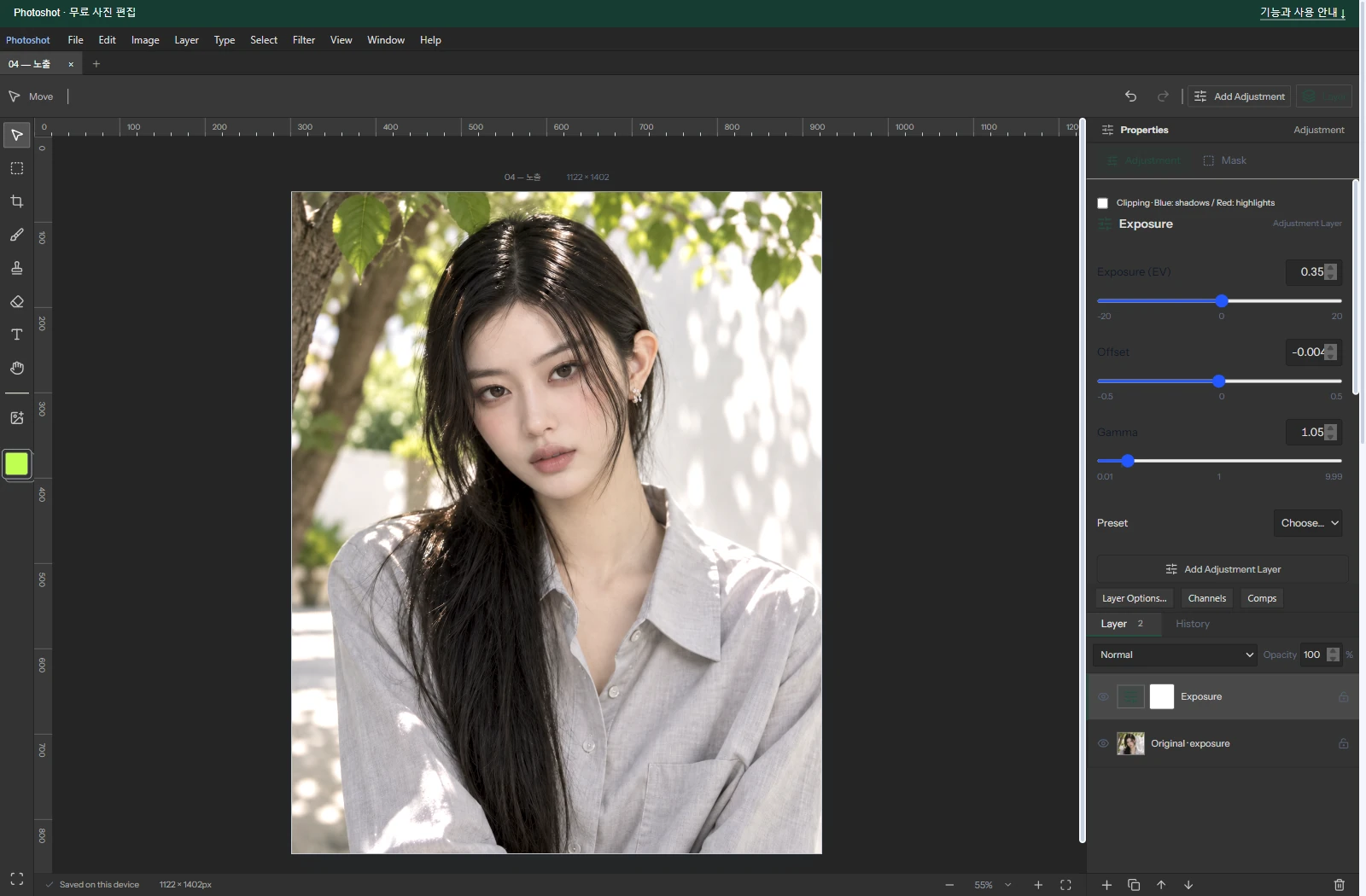
The portrait example uses EV +0.35, offset −0.004 and gamma 1.05. Its source portrait is AI-generated; the screenshot and result are from Photoshot.
In the historical Photoshop chart comparison, +1 / 0 / 1 produced mean difference about 0.015 and maximum 2; −0.7 / 0.015 / 1.2 produced about 0.015 and maximum 1. These are two recorded test conditions, not a claim covering every HDR or color-management workflow.

Parts 1–5: find, connect and revise code
The first five entries share a method: use actual dependencies such as React and early PixiJS; inspect implementations such as Konva and glfx.js; connect them with AI-assisted document, layer, calculation and UI code; then revise against measured output.
Exposure shows how that work becomes a foundation for another feature. The excerpts use public v0.16.0 code, with sources and test scope kept explicit so the reuse and new implementation remain traceable.